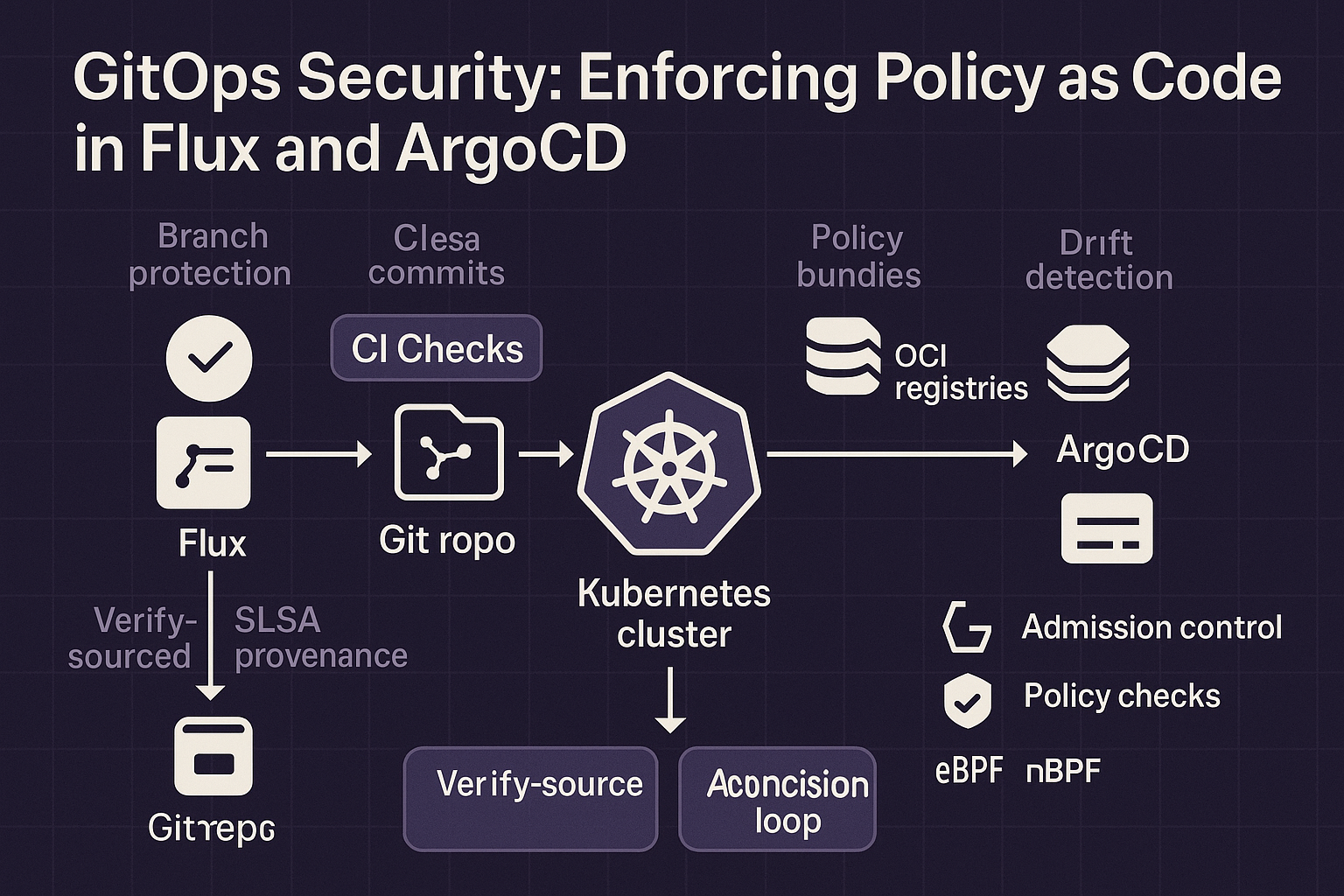
GitOps has revolutionized how we deploy and manage Kubernetes infrastructure, but it's also opened new attack surfaces. A misconfigured YAML file in Git can instantly deploy vulnerabilities to production. A compromised repository can become a supply chain nightmare. The question isn't whether to adopt GitOps—it's how to secure it from day one.
This guide shows you how to integrate Policy as Code directly into your GitOps workflows using Flux and ArgoCD. You'll learn how to enforce policies at the Git layer, prevent drift, and automate compliance—all before a single resource hits your cluster.
🎯 GitOps Security by the Numbers (2025)
📋 Table of Contents
🔐 Why GitOps Security Matters in 2025
GitOps delivers incredible benefits: declarative infrastructure, audit trails, and easy rollbacks. But it also centralizes risk. Your Git repository becomes the single source of truth—and a single point of failure.
Consider these real-world scenarios:
- Scenario 1: A developer commits a Deployment with
privileged: true. ArgoCD syncs it immediately. You now have a container escape vulnerability in production. - Scenario 2: An attacker compromises a CI/CD bot account with write access to your Git repo. They inject a malicious ConfigMap. Flux deploys it automatically.
- Scenario 3: A well-meaning engineer copies a Helm chart from the internet and commits it. The chart contains a backdoored image. Your GitOps tool dutifully deploys the compromise.
The solution? Policy as Code at the GitOps layer. This means validating every commit, every PR, and every sync operation against your security and compliance policies—before resources reach the cluster.
⚠️ The GitOps Threat Model: What Can Go Wrong?
Let's build a threat model for GitOps. Understanding the attack surface is the first step to securing it.
The GitOps Attack Surface
# 1. Git Repository Compromise
# Threat: Attacker gains write access to the repo
# Impact: Can inject malicious manifests, modify existing resources
# Mitigation: Branch protection, signed commits, RBAC

# 2. Misconfigured Manifests
# Threat: Developer commits insecure configuration
# Impact: Privilege escalation, resource abuse, data exposure
# Mitigation: Pre-commit hooks, CI/CD validation, admission control

# 3. Supply Chain Attacks
# Threat: Malicious images or Helm charts in dependencies
# Impact: Backdoors, crypto miners, data exfiltration
# Mitigation: Image scanning, SBOM validation, signature verification

# 4. Excessive RBAC Permissions
# Threat: GitOps controller has admin access to cluster
# Impact: If controller is compromised, entire cluster is compromised
# Mitigation: Least privilege, namespace isolation, workload identity

# 5. Drift and Tampering
# Threat: Manual changes to cluster bypass GitOps
# Impact: Configuration drift, compliance violations
# Mitigation: Drift detection, automated reconciliation, audit logging
🌊 Securing Flux CD with Policy as Code
Flux CD is a CNCF graduated project that implements GitOps for Kubernetes. It watches your Git repositories and automatically applies changes to your cluster. Let's secure it with policies at multiple layers.
Layer 1: Git-Level Validation with Pre-Commit Hooks
The first line of defense is preventing bad manifests from ever reaching Git. Use pre-commit hooks to run policy checks locally.
Pre-Commit Hook with Conftest (OPA)
# .pre-commit-config.yaml
repos:
  - repo: https://github.com/instrumenta/conftest
    rev: v0.45.0
    hooks:
      - id: conftest
        name: Validate Kubernetes manifests with Conftest
        entry: conftest test
        args:
          - --policy=policy/
          - --namespace=main
          - --all-namespaces
        files: \.(yaml|yml)$
        language: system

# policy/deployment.rego
package main

deny[msg] {
  input.kind == "Deployment"
  not input.spec.template.spec.securityContext.runAsNonRoot
  msg = "Containers must not run as root"
}

deny[msg] {
  input.kind == "Deployment"
  container := input.spec.template.spec.containers[_]
  container.securityContext.privileged == true
  msg = sprintf("Container %s is privileged", [container.name])
}

deny[msg] {
  input.kind == "Deployment"
  not input.spec.template.metadata.labels["app.kubernetes.io/name"]
  msg = "Deployment must have standard labels"
}
Layer 2: CI/CD Pipeline Validation
Even with pre-commit hooks, you need server-side enforcement. Add policy checks to your CI/CD pipeline.
GitHub Actions Workflow with OPA
# .github/workflows/validate-manifests.yml
name: Validate Kubernetes Manifests

on:
  pull_request:
    paths:
      - 'clusters/**/*.yaml'
      - 'apps/**/*.yaml'

jobs:
  validate:
    runs-on: ubuntu-latest
    steps:
      - uses: actions/checkout@v4

      - name: Setup Conftest
        run: |
          wget https://github.com/open-policy-agent/conftest/releases/download/v0.45.0/conftest_0.45.0_Linux_x86_64.tar.gz
          tar xzf conftest_0.45.0_Linux_x86_64.tar.gz
          sudo mv conftest /usr/local/bin

      - name: Validate with OPA Policies
        run: |
          conftest test clusters/ apps/ \
            --policy policy/ \
            --namespace main \
            --all-namespaces \
            --fail-on-warn

      - name: Check for Image Vulnerabilities
        uses: aquasecurity/trivy-action@master
        with:
          scan-type: 'config'
          scan-ref: '.'
          severity: 'CRITICAL,HIGH'
          exit-code: '1'

      - name: Validate Flux Manifests
        run: |
          flux install --export > /tmp/flux-system.yaml
          conftest test /tmp/flux-system.yaml --policy policy/
Layer 3: Cluster-Level Admission Control
Even if a bad manifest bypasses Git and CI, admission controllers are your final gate. Use OPA Gatekeeper or Kyverno.
OPA Gatekeeper Constraint for Flux
# constraints/require-flux-annotations.yaml
apiVersion: constraints.gatekeeper.sh/v1beta1
kind: K8sRequiredAnnotations
metadata:
  name: require-flux-source
spec:
  match:
    kinds:
      - apiGroups: ["apps"]
        kinds: ["Deployment", "StatefulSet", "DaemonSet"]
  parameters:
    annotations:
      - key: "kustomize.toolkit.fluxcd.io/name"
        allowedRegex: "^[a-z0-9-]+$"
      - key: "kustomize.toolkit.fluxcd.io/namespace"
        allowedRegex: "^[a-z0-9-]+$"
    message: "All workloads must be managed by Flux with proper annotations"

---
# Block manual kubectl apply by requiring Flux annotations
apiVersion: constraints.gatekeeper.sh/v1beta1
kind: K8sDenyDirectApply
metadata:
  name: deny-non-flux-deploys
spec:
  match:
    kinds:
      - apiGroups: ["*"]
        kinds: ["*"]
    excludedNamespaces: ["kube-system", "flux-system", "gatekeeper-system"]
  parameters:
    requireAnnotations:
      - "kustomize.toolkit.fluxcd.io/name"
    message: "Resources must be managed through Flux, not directly applied"
🎯 Securing ArgoCD with OPA and RBAC
ArgoCD is the other GitOps giant. Unlike Flux's pull-based approach, ArgoCD offers a UI and can operate in both pull and push modes. This adds convenience but also attack surface.
Integrating OPA with ArgoCD
ArgoCD has native support for OPA policies through its Application validation feature.
ArgoCD ConfigMap with OPA
# argocd-cm.yaml
apiVersion: v1
kind: ConfigMap
metadata:
  name: argocd-cm
  namespace: argocd
data:
  # Enable OPA for resource validation
  resource.customizations.health.argoproj.io_Application: |
    hs = {}
    hs.status = "Progressing"
    hs.message = ""
    if obj.status ~= nil then
      if obj.status.health ~= nil then
        hs.status = obj.status.health.status
        if obj.status.health.message ~= nil then
          hs.message = obj.status.health.message
        end
      end
    end
    return hs

  # OPA policy for resource validation
  resource.customizations.validate.argoproj.io_Application: |
    package argocd

    deny[msg] {
      input.kind == "Deployment"
      not input.spec.template.spec.securityContext.runAsNonRoot
      msg = "Containers must not run as root"
    }

    deny[msg] {
      input.kind == "Service"
      input.spec.type == "LoadBalancer"
      not input.metadata.annotations["service.beta.kubernetes.io/aws-load-balancer-internal"]
      msg = "LoadBalancer services must be internal"
    }

---
# policy/argocd-policies.rego
package argocd

import future.keywords.if
import future.keywords.in

# Deny privileged containers
deny[msg] if {
  input.kind == "Deployment"
  container := input.spec.template.spec.containers[_]
  container.securityContext.privileged == true
  msg := sprintf("Privileged container not allowed: %s", [container.name])
}

# Require resource limits
deny[msg] if {
  input.kind in ["Deployment", "StatefulSet"]
  container := input.spec.template.spec.containers[_]
  not container.resources.limits.cpu
  msg := sprintf("Container %s missing CPU limit", [container.name])
}

# Require specific namespaces
deny[msg] if {
  input.metadata.namespace in ["default", "kube-public"]
  msg := "Resources must not be deployed to default or kube-public namespaces"
}
ArgoCD RBAC Hardening
ArgoCD's RBAC is powerful but complex. Follow least privilege principles.
Restricted ArgoCD RBAC Policy
# argocd-rbac-cm.yaml
apiVersion: v1
kind: ConfigMap
metadata:
  name: argocd-rbac-cm
  namespace: argocd
data:
  policy.default: role:readonly
  policy.csv: |
    # Platform team: Full access to platform apps only
    p, role:platform-admin, applications, *, platform-*, allow
    p, role:platform-admin, repositories, *, *, allow
    p, role:platform-admin, clusters, get, *, allow
    g, platform-team, role:platform-admin

    # App teams: Limited to their namespace
    p, role:app-team-dev, applications, get, team-alpha/*, allow
    p, role:app-team-dev, applications, sync, team-alpha/*, allow
    p, role:app-team-dev, applications, create, team-alpha/*, allow
    p, role:app-team-dev, applications, delete, team-alpha/*, deny
    g, team-alpha-devs, role:app-team-dev

    # Read-only auditors
    p, role:auditor, applications, get, */*, allow
    p, role:auditor, repositories, get, *, allow
    p, role:auditor, clusters, get, *, allow
    p, role:auditor, logs, get, */*, allow
    g, security-team, role:auditor

    # Deny dangerous actions globally
    p, role:*, applications, delete, */*, deny
    p, role:*, clusters, delete, *, deny
🚀 Advanced Patterns: Multi-Cluster, Multi-Tenant
Pattern 1: Multi-Cluster GitOps with Centralized Policy
Use a central OPA cluster to validate policies across all environments before deployment.
Centralized OPA for Multi-Cluster
# Policy decision flow:
# 1. Developer commits to Git
# 2. CI validates against central OPA instance
# 3. If approved, PR merges
# 4. Flux/ArgoCD syncs to dev cluster
# 5. Dev cluster admission controller re-validates
# 6. Promotion to prod requires additional approvals

# central-policy-service.yaml
apiVersion: apps/v1
kind: Deployment
metadata:
  name: opa-central
  namespace: policy-system
spec:
  replicas: 3
  template:
    spec:
      containers:
      - name: opa
        image: openpolicyagent/opa:latest
        args:
          - "run"
          - "--server"
          - "--addr=0.0.0.0:8181"
          - "--bundle=/policies"
        volumeMounts:
        - name: policies
          mountPath: /policies
      volumes:
      - name: policies
        configMap:
          name: central-policies

---
apiVersion: v1
kind: Service
metadata:
  name: opa-central
  namespace: policy-system
spec:
  ports:
  - port: 8181
    targetPort: 8181
  selector:
    app: opa-central
Pattern 2: Progressive Delivery with Policy Gates
Use Flagger or Argo Rollouts with policy validation at each stage.
Flagger Canary with Policy Checks
# flagger-canary.yaml
apiVersion: flagger.app/v1beta1
kind: Canary
metadata:
  name: api-service
  namespace: production
spec:
  targetRef:
    apiVersion: apps/v1
    kind: Deployment
    name: api-service
  service:
    port: 8080
  analysis:
    interval: 1m
    threshold: 5
    maxWeight: 50
    stepWeight: 10
    # Custom policy check as a webhook
    webhooks:
      - name: policy-validation
        url: http://opa-service.policy-system/v1/data/canary/allow
        timeout: 5s
        metadata:
          type: pre-rollout
      - name: security-scan
        url: http://trivy-service/scan
        timeout: 30s
        metadata:
          type: pre-rollout
    metrics:
      - name: request-success-rate
        thresholdRange:
          min: 99
        interval: 1m
      - name: request-duration
        thresholdRange:
          max: 500
        interval: 1m

---
# policy/canary-policy.rego
package canary

import future.keywords.if

default allow = false

allow if {
  # Check 1: Image must be signed
  input.image_signature_valid == true

  # Check 2: No critical vulnerabilities
  count(input.vulnerabilities.critical) == 0

  # Check 3: Resource limits are set
  input.resources.limits.cpu
  input.resources.limits.memory

  # Check 4: Service mesh sidecar is present
  input.istio_sidecar == true
}
🛠️ Complete Implementation Guide
Step-by-Step: Secure GitOps from Scratch
Step 1: Set Up Git Repository Security
# Enable branch protection on GitHub
# Settings > Branches > Add rule
# - Require pull request reviews before merging
# - Require status checks to pass before merging
# - Require signed commits
# - Include administrators

# Configure signed commits
git config --global commit.gpgsign true
git config --global user.signingkey YOUR_GPG_KEY

# Add CODEOWNERS file
# .github/CODEOWNERS
# All changes require platform team approval
*       @org/platform-team

# Sensitive directories need security team approval
/policies/      @org/platform-team @org/security-team
/clusters/prod/ @org/platform-team @org/security-team
Step 2: Install and Configure Flux with Policies
# Install Flux CLI
curl -s https://fluxcd.io/install.sh | sudo bash

# Bootstrap Flux with GitHub
flux bootstrap github \
  --owner=your-org \
  --repository=fleet-infra \
  --branch=main \
  --path=clusters/production \
  --personal=false \
  --components-extra=image-reflector-controller,image-automation-controller

# Create policy namespace
kubectl create namespace policy-system

# Install OPA Gatekeeper
kubectl apply -f https://raw.githubusercontent.com/open-policy-agent/gatekeeper/release-3.14/deploy/gatekeeper.yaml

# Install Kyverno (alternative)
kubectl create -f https://github.com/kyverno/kyverno/releases/download/v1.10.0/install.yaml

# Deploy constraint template
cat <
Step 3: Configure CI/CD Pipeline Validation
# Complete GitHub Actions workflow
# .github/workflows/gitops-security.yml
name: GitOps Security Validation

on:
  pull_request:
    branches: [main]
  push:
    branches: [main]

jobs:
  validate-policies:
    runs-on: ubuntu-latest
    steps:
      - uses: actions/checkout@v4

      - name: Install tools
        run: |
          # Install Conftest
          wget -q https://github.com/open-policy-agent/conftest/releases/download/v0.45.0/conftest_0.45.0_Linux_x86_64.tar.gz
          tar xzf conftest_0.45.0_Linux_x86_64.tar.gz
          sudo mv conftest /usr/local/bin/

          # Install kubeval
          wget -q https://github.com/instrumenta/kubeval/releases/latest/download/kubeval-linux-amd64.tar.gz
          tar xzf kubeval-linux-amd64.tar.gz
          sudo mv kubeval /usr/local/bin/

          # Install Flux CLI
          curl -s https://fluxcd.io/install.sh | sudo bash

      - name: Validate Kubernetes Syntax
        run: |
          find . -name '*.yaml' -o -name '*.yml' | \
          xargs kubeval --strict --ignore-missing-schemas

      - name: Run OPA Policy Tests
        run: |
          conftest test clusters/ apps/ \
            --policy policy/ \
            --all-namespaces \
            --fail-on-warn

      - name: Validate Flux Resources
        run: |
          flux diff kustomization flux-system \
            --path ./clusters/production \
            --kustomization-file ./clusters/production/flux-system/kustomization.yaml

      - name: Scan for Secrets
        uses: trufflesecurity/trufflehog@main
        with:
          path: ./
          base: ${{ github.event.repository.default_branch }}
          head: HEAD

      - name: Container Image Scanning
        uses: aquasecurity/trivy-action@master
        with:
          scan-type: 'config'
          scan-ref: '.'
          format: 'sarif'
          output: 'trivy-results.sarif'
          severity: 'CRITICAL,HIGH'
          exit-code: '1'

      - name: Upload Trivy Results
        uses: github/codeql-action/upload-sarif@v2
        if: always()
        with:
          sarif_file: 'trivy-results.sarif'
Step 4: Set Up Monitoring and Alerting
# Deploy Falco for runtime security
helm repo add falcosecurity https://falcosecurity.github.io/charts
helm repo update
helm install falco falcosecurity/falco \
  --namespace falco-system \
  --create-namespace \
  --set falcosidekick.enabled=true \
  --set falcosidekick.webui.enabled=true

# Custom Falco rule for GitOps
cat <
        kevt and
        ka.target.namespace = "flux-system" and
        (ka.verb in (create, delete, patch)) and
        not ka.user.name startswith "system:serviceaccount:flux-system"
      output: >
        Unauthorized modification to Flux resource
        (user=%ka.user.name resource=%ka.target.name namespace=%ka.target.namespace verb=%ka.verb)
      priority: WARNING
      source: k8s_audit
      tags: [gitops, flux, security]
EOF

# Set up Prometheus alerts
cat < 0
        for: 10m
        labels:
          severity: warning
        annotations:
          summary: "Flux reconciliation failed"
          description: "{{ $labels.kind }}/{{ $labels.name }} in {{ $labels.namespace }} failed reconciliation"

      - alert: PolicyViolationDetected
        expr: |
          increase(gatekeeper_violations_total[5m]) > 0
        for: 5m
        labels:
          severity: critical
        annotations:
          summary: "Policy violation detected"
          description: "Gatekeeper detected {{ $value }} policy violations in the last 5 minutes"
EOF
🎯 Key Takeaways
- Defense in Depth: Implement policies at Git, CI/CD, and cluster levels—every layer matters.
- Shift Left: Catch issues in pre-commit hooks and CI before they reach production.
- Automation is Key: Manual reviews don't scale. Automate policy enforcement with OPA, Gatekeeper, or Kyverno.
- Audit Everything: GitOps provides an audit trail, but you need to monitor it with tools like Falco and Prometheus.
- Start Simple: Begin with basic policies (no privileged containers, require labels) and expand over time.
- Test Your Policies: Write unit tests for your Rego policies using OPA's test framework.
🔮 The Future of GitOps Security
Looking ahead to 2026 and beyond, expect these trends:
- AI-Assisted Policy Generation: LLMs will help generate and explain complex Rego policies from natural language requirements.
- Policy-as-a-Service: Centralized policy hubs that serve multiple clusters and teams with versioned, tested policies.
- Zero Trust GitOps: Every commit requires cryptographic proof of identity and intent, with policies enforcing continuous verification.
- Supply Chain Attestation: SLSA Level 3+ compliance will be table stakes, with full provenance tracking from commit to deployment.
- Automatic Remediation: Policies won't just block—they'll auto-fix violations where safe, opening PRs with corrections.
The organizations that win will treat their Git repositories as critical infrastructure and secure them accordingly. GitOps isn't just a deployment pattern—it's your security perimeter.